The German MICE Market 2025: New Record in Participants

Marc Blindenbacher
July 29, 2026
•
7
min


Address your contacts automatically in their preferred language – from the event website to the booking confirmation. The built-in AI translation transfers your text into all activated languages at the click of a button.

Oniva, as an Event management platform, is built to run events and campaign groups in several languages at once. This is especially valuable when you're inviting contacts from different language regions, for example from German-speaking Switzerland, French-speaking Switzerland and English-speaking countries: every person receives the event website, forms and all communications automatically in their preferred language. So that you don't have to maintain this multilingual content by hand, the built-in AI translation translates text into all activated languages at the click of a button. This article explains which languages are available, how you activate them for an event or campaign group, how AI translation works, and how your contacts' language governs all of their communications.
Oniva supports the following languages for event websites, forms and automated communications:
German is available in two variants: German (CH) follows the spelling conventions used in Switzerland, without "ß" (so "Strasse" instead of "Straße"), while German (DE) uses the spelling conventions for Germany. Choose the variant that matches the market you communicate with most.
Separate from the languages of the event website are the languages of the Oniva interface itself – the admin you use to configure your events: this is currently available in German, English, French and Italian. That means you, as an organiser, can use the admin in English, for example, and still create events whose event website and communications are delivered in languages such as Polish or Swedish too.
Which languages are available to you at all is controlled via the tenant settings. If a language is missing from the selection, it can be activated there by the tenant admin. Only then does it become available for workspaces, events and campaign groups.
When creating an event or campaign group, you choose from the languages activated at organisation level those that are relevant for this event or campaign group. You don't have to carry over every language available across the whole organisation – only the ones your target audience actually needs.
You also set a default language. It serves as a fallback in two situations:
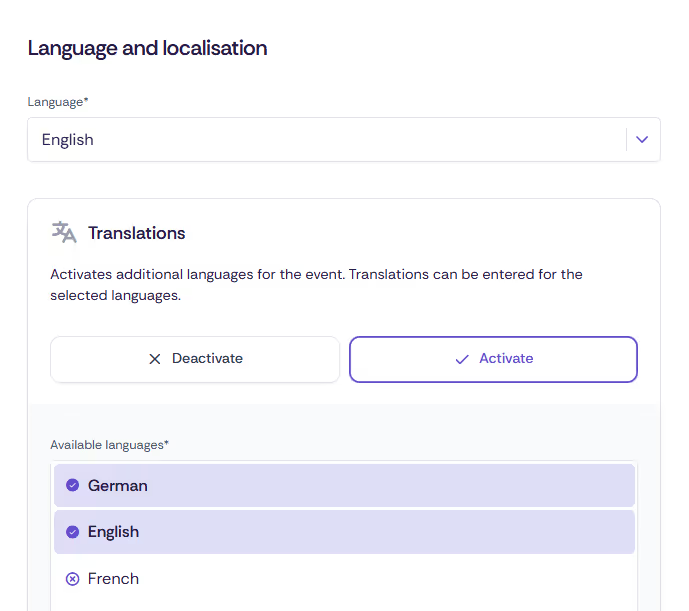
👉 Tip: Make sure to choose as your default language the one in which you're most likely to keep complete, proofread content, since it's the one that appears wherever a translation is missing.
All text fields – such as descriptions, titles or info texts – as well as selected form fields can be translated using AI. Here's how:
For the "Translate" option to appear at all, at least two languages must be activated for the event. With only one active language, there is naturally nothing to translate.
⚠️ Important: If text has already been added manually to a field, it will be overwritten by the newly generated translation when you click "Translate" – and this cannot be undone. Before triggering AI translation, check whether a language already contains manually maintained, approved text that you want to keep.
👉 Tip: Even though AI translation is very reliable, it's worth doing a quick proofreading pass before you publish the event. Check in particular:
whether product terms and fixed names (e.g. names of booking options, venue or company names) have been carried over correctly;
whether the form of address (informal/formal, or the equivalent in the target language) matches your usual tone; and
whether placeholders, links and formatting (bold text, bullet points) have been preserved.
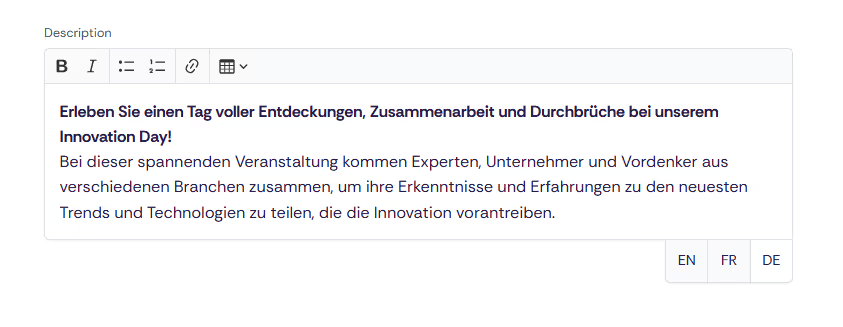
Every text field offers tabs for all activated languages, into which you can enter translations, regardless of whether you've used AI translation or not. If no translation is entered for a language, the default language is shown there automatically instead.
This allows you to work in two stages: use AI translation to quickly get a usable first version for all languages, and then fine-tune, in the individual language tabs, the spots that need a human touch – wordplay, brand names or industry-specific phrasing, for example. Manual adjustments to individual tabs are kept as long as you don't click "Translate" again.
For contacts to actually be addressed in their preferred language, Oniva needs to know what that language is. There are three ways to set it:
If a language is on file for a contact, they receive all notifications and campaigns in that language. Their personal event link is also created directly in that language. If no language is on file for a contact, the default language defined for the event or campaign group applies.
A contact's language affects all of their communications: invitations, notifications (e.g. booking confirmation, deregistration or cancellation confirmation) and campaigns are automatically sent in the language on file. The personal event link, through which guests register or authenticate, is also generated directly in that language, so the guest journey stays consistent in one language from the very first click – without you having to set up separate campaigns for each language group.
A contact's language preference is displayed in the contact list and can be used for reporting. This gives you an at-a-glance view of how your target audience breaks down by language, for example to decide which languages are worth the extra translation effort, or to segment language-specific campaigns (e.g. reminders with local directions) precisely.
Discover exciting articles about creating unforgettable events.