
The German MICE Market 2025: New Record in Participants

Marc Blindenbacher
July 29, 2026
•
7
min


Generally, emails can have problems either when sent by Oniva or when received by the contact's mail client. If a campaign has been sent, the contact can be opened to check if the email has left the outbox.

There can be various reasons why emails and SMS cannot be delivered – either already at the point of sending by Oniva, or only when they are received by the contact's mail client.
In this article, you will find possible troubleshooting measures as well as tips to help you improve the delivery rate of your emails and SMS.

To check whether a contact is considered a recipient of a campaign, you can go to Contacts and apply the filter "Campaign not yet delivered", then select the desired campaign.
If the contact is not shown, they have been excluded from the mailing for one of the following reasons:
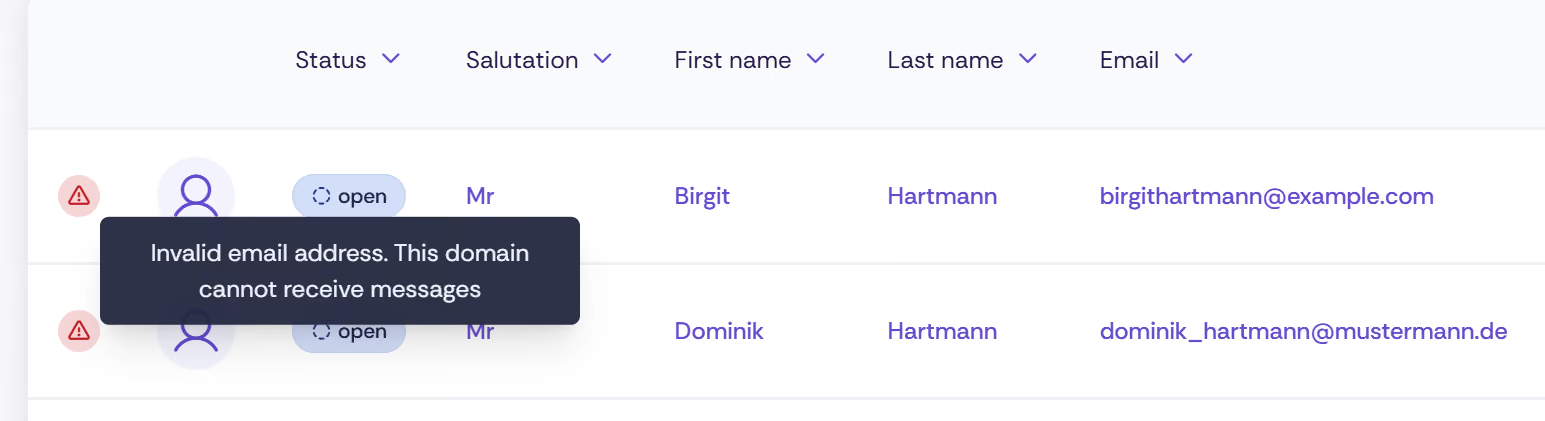
Contacts for whom the sending of an email has failed are marked as faulty in Oniva. If you hover your mouse over the corresponding icon, an error message with further information will be displayed.
An overview of the error messages and their meaning can be found under Invalid contacts.
If all or very many emails fail, the cause may also lie with the message itself or with the email sender address used. In these cases too, Oniva displays a corresponding error message.
👉 Tip: With a tool such as Mail-Tester, you can check the quality and deliverability of your email sending. To do this, send a test email of your campaign directly from Oniva to the address provided by Mail-Tester, and then check the result.
Please note: Mail-Tester is an external tool. Do not use any relevant or confidential data for the test.
👉 Tip: If you have collected contact data such as an email address or phone number via a registration form, but the corresponding columns remain empty in Contacts, this may be because the wrong identifier was linked to the value in question. In this case, check whether the identifier for the email address or phone number in the registration form is correctly set in the authorisation group.
This occurs when a campaign is shown as "sent" in Oniva and shows no error, but the contact reports that the email has not arrived in their inbox.
Whether an email is delivered or ends up in the spam folder depends, among other things, on the mail client used as well as the spam settings of the organisation or the individual mailbox. This is why the same email can end up in one person's inbox and another person's spam folder.
You can improve the delivery rate with the following measures:
When sending campaigns, Oniva places a so-called tracking pixel in every email. This pixel enables Oniva to receive feedback when the email is opened.
Some mail clients and settings block tracking pixels. In these cases, Oniva does not receive feedback about the opening. The actual number of opened emails may therefore be higher than the number shown in the reports.
For a campaign to be recorded as opened or read, the recipient must download or display the images in the email.
Discover exciting articles about creating unforgettable events.