
The German MICE Market 2025: New Record in Participants

Marc Blindenbacher
July 29, 2026
•
7
min


Campaign groups allow you to create and manage a target audience independently of event communications.

Campaign groups are newsletter series that are based on a shared target audience and use consistent branding and settings. They allow recurring mailings, such as product or departmental newsletters or organisational news, to be sent independently of events.
👉 See also campaigns

You can access your campaign group in the settings section of the admin area. If this option is not available, your account might not be authorised to use campaign groups. Standalone campaign groups are not available for all licence models but can be activated as an add-on. Event campaigns are available in all licence models.
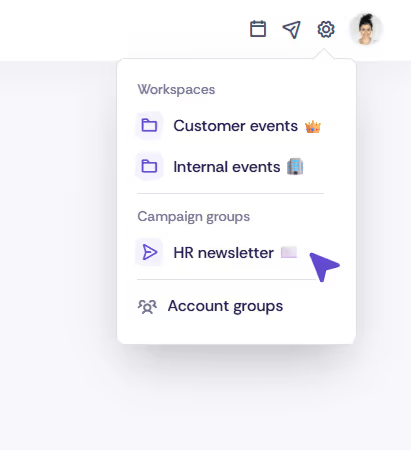
To request authorisation, you can contact our support team using the form at the bottom of this article.
Within a campaign group, you can configure essential settings such as branding, sender addresses, and audience management. Once you open a campaign group, you will see a dashboard that allows you to manage the group’s contacts and settings.

You can either import contacts into a campaign group or add them manually, similar to managing event contacts. Additionally, you can create contact groups to target specific segments of your campaign audience with tailored campaigns.
For more information on managing contacts, check out our article on event contacts.
The settings for your campaign group include the following configurable areas:
The email template specifies the standard header and footer for all campaigns. You can adjust the sender address in the email settings.
Oniva provides a default sender address for each workspace. The reply-to address can be freely configured. If you wish to use a different sender address for a specific campaign, contact Oniva support to enable this.
The language options allow you to activate additional languages or change the default language. Note that only default texts are automatically translated. Titles, names, and other custom content must be manually adjusted for each language. Beneath each text field, you will find language options. Click on the corresponding language code to add translations for each language.
Through the access settings, campaign admins can add other users to the campaign group or manage their permissions. Only existing admins can be added.
Archiving a campaign group hides the associated contacts and campaigns. This is useful for organising older campaigns without deleting them permanently. Archived groups can be reactivated at any time.
The anonymisation feature permanently deletes personal data such as first names, last names, and email addresses. This helps you comply with data protection regulations and securely remove sensitive information. Be aware that anonymised data cannot be restored.
Deleting a campaign group permanently removes all associated campaigns and contacts. This action cannot be undone. Make sure no important data is needed before proceeding with deletion.
Campaign groups are standalone newsletter series that function independently of events – e.g. for department or product newsletters. Event campaigns are tied to a specific event (invitations, reminders, thank-you messages, etc.) and are available in all licence models. Standalone campaign groups can be activated as an add-on depending on the licence.
Discover exciting articles about creating unforgettable events.