
Articles by topic

Online Events

Table of contents

Last updated:
26.11.2026

Oniva AI assistant

he Oniva assistant answers your questions about your event directly in Oniva. It analyses key figures, gives you tips on event management and explains step by step how to set up features. In this article, you'll find out how to open the assistant, which data it accesses and what to bear in mind.
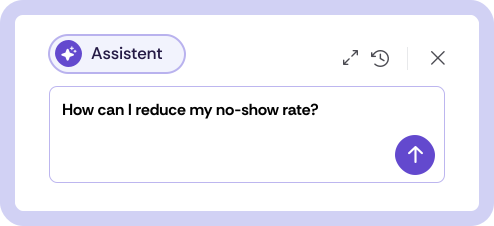
Oniva Assistant: Input field with the question "How can I reduce the no-show rate?"

What is the Oniva assistant?

The Oniva assistant is an AI-powered helper in your Event software. You ask your question in your own words, and the assistant replies in the chat.

You can use it for three things:

  • Analysing event data, for example the number of registrations, menu choices or the no-show rate
  • Tips & tricks for invitations, reminders and a better participant experience
  • Guides to configuring workspaces and events, based on the articles in this help desk

‍

Opening the assistant

  1. Open the event you have a question about.
  2. Click Assistant in the top navigation.
  3. Type your question into the input field and send it.
  4. For longer analyses, you can use the assistant in full-screen mode.

The assistant is available on every page of Oniva via the top navigation.

‍

The assistant knows your event

When you open the assistant within an event, it knows the context of that event. So you don't need to explain which event you mean: “How many guests have registered?” is enough.

One event per conversation: the assistant currently only ever accesses one event. Cross-event analyses are not yet possible, for example:

  • Comparing participant numbers across several events
  • Summarising key figures for all events in a workspace or a year

If you want to analyse a different event, open that event and ask your question there. For cross-event analyses, use the workspace report (currently without the assistant) and its data export.

‍

What data does the assistant access?

The assistant works with figures from the guest list, not with your guests' personal data. So it can count and analyse, but it can't name individual people or create lists of names.

The assistant can … The assistant cannot …
Count registrations, cancellations and RSVP statusName guests
Analyse answers from the registration form, e.g. menu choiceShow email addresses or phone numbers
Calculate key figures such as the no-show rate or check-in rateShow the organisations or job titles of individual guests
Answer questions about the event configurationExport guest lists or search for individual guests
The assistant can …
Count registrations, cancellations and RSVP status
Analyse answers from the registration form, e.g. menu choice
Calculate key figures such as the no-show rate or check-in rate
Answer questions about the event configuration
The assistant cannot …
Name guests
Show email addresses or phone numbers
Show the organisations or job titles of individual guests
Export guest lists or search for individual guests

‍

If you want to know which guests chose the vegetarian option, for example, filter the guest list directly in the event.

‍

Example questions

Analysing event data

  • “How many guests have registered so far?”
  • “How many vegetarians are attending the event?”
  • “What was the no-show rate?”

Tips & tricks

  • “How do I reduce the no-show rate?”
  • “When should I send the reminder?”

Guides

  • “Why can't people register for my event any more?”
  • “How do I set up accompanying guests for registration?”
  • “How do I activate e-tickets for check-in?”

Tip: the more specific your question, the better the answer. For example, mention the time period, the status or the registration form field you're interested in.

‍

Wichtig: Ergebnisse immer prüfen

Please note: the Oniva assistant is based on artificial intelligence. Its answers may be incomplete or incorrect. So always check figures and details before you pass them on or base decisions on them.

How to check the results:

  • Figures: compare them with the dashboard or the filtered guest list of the event.
  • Guides: follow the linked help desk article if a step doesn't work as described.
  • Critical information: always verify details for catering, security or billing against the original data.

‍

How many questions can I ask the assistant?

Depending on your licence tier, your licence includes a fixed number of AI credits per year. You can see how many in the price list. You'll find your current usage in the entity dashboard. If you've used up your credits for the current year, you can request more from the Oniva team.

Download

Was this article helpful?

Frequently asked questions

Everything you need to know about this topic.
Can the assistant create or modify events?

Not yet. Creating and editing events via the assistant is currently in development. Until then, it will guide you through the setup step by step.

The assistant's count doesn't match the dashboard. What now?

The data in the dashboard and the guest list is authoritative. Please rephrase your question more specifically, for example by including the desired status. If the discrepancy persists, please contact Oniva Support.

Why doesn't the assistant give me any names?

The assistant intentionally does not have access to personal data such as names, email addresses, or organizations. This ensures your guests' data remains protected. You can find individual guests via the guest list.

Helpful information for event managers

Discover exciting articles about creating unforgettable events.
Didn't find an answer?

If you couldn't find the information you were looking for, our support team is happy to help. Create a ticket, and we will get back to you as soon as possible.
Time icon
Support hours
Monday to Friday, 08:00 to 17:00 (excluding public holidays in the city of Zurich)
Warning icon
Third-party cookies required
Your browser's security settings do not allow third-party cookies. Please adjust your browser's security settings or try a different browser to view this content.
Warning icon
Third-party cookies required
Your browser's security settings do not allow third-party cookies. Please adjust your browser's security settings or try a different browser to view this content.